Melody Cake Composer Guide
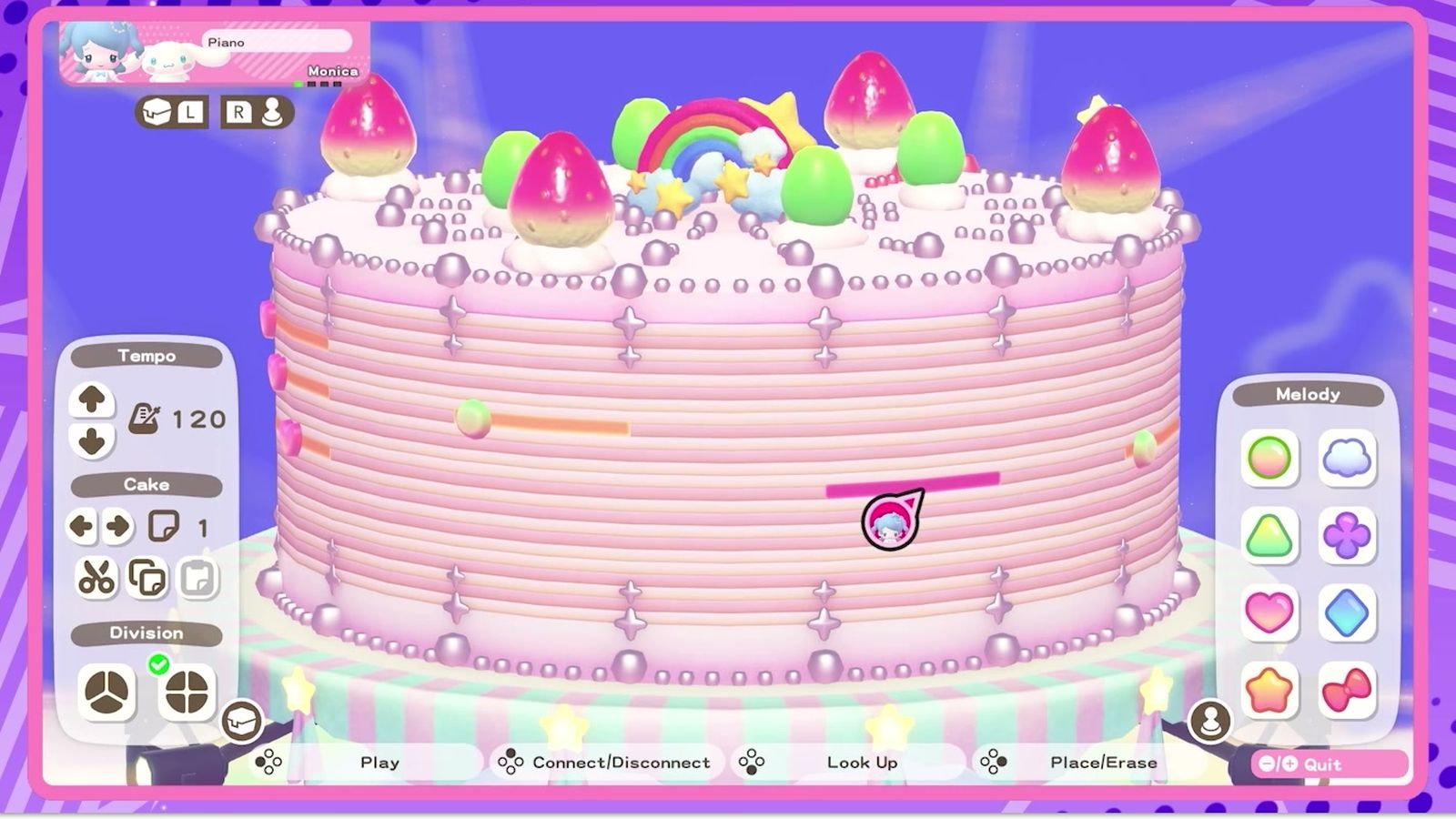
The Melody Cake turns decorations into sound: the top is percussion, the sides are melody, and each piece is one measure. A 4/4 cake has 16 pieces, 3/4 has 12, and the catalog holds four books of sixteen cakes.
Melody Cake is the music tool at the left end of the Creative Labo: an odd device that plays your decorations as sounds. It looks like a cooking minigame and is actually a small sequencer with a fixed grid.
The two halves of a cake
| Part | What it controls | Limit |
|---|---|---|
| Top of the cake | Percussion | Up to 4 decorations per piece |
| Sides of the cake | Melody | Up to 4 decorations per piece |
Press the bottom button to swap between the two. The decoration type depends on the instrument you have selected, and each one plays a different sound. You cannot double up on the same decoration.
The grid, and the numbers that matter
| Time signature | Pieces per cake | What a piece is |
|---|---|---|
| 4/4 | 16 | One measure |
| 3/4 | 12 | One measure |
The pitch of the notes changes depending on where a decoration sits on the piece, so placement is pitch, not just rhythm. Playback starts from the gap between the differently coloured pieces — that gap is the start line, not decoration.
The interface, control by control
| Control | Effect |
|---|---|
| SL / SR | Switch between the Tool menu and the Instrument menu |
| Bottom button | Return the cursor to the cake (and toggle top/side) |
| Confirm | Place a decoration; press again to delete it |
| Left button | Loop the current playback so you can decorate by ear |
| Top button | Connect a melody to the one on its left |
The instrument menu is where the decoration set comes from; the tool menu holds the cake-level operations.
Four catalogs, sixteen cakes each
| Catalog fact | Value |
|---|---|
| Catalogs | 4 |
| Cakes per catalog | 16 |
| Copy behaviour | Select a catalog and press the top button to copy its contents; pick another and confirm to paste and overwrite |
| Sample catalogs | Included, and copyable |
| Copy inside a catalog | Cakes can be copied and pasted within the same catalog |
The number on the right of a cake is its placement in the catalog. Copying a whole catalog is the fast way to start from a sample and keep your own work separate.
Connecting melodies
If you line up two copies of the same melody side by side, you can connect them into a longer tune: press the top button on the right-hand melody and it joins the one on the left. That is the only way to build past 16 measures in 4/4 without changing the time signature.
The technique that works: build one good 16-measure section, duplicate it, then edit the second copy. Connection is positional, so identical copies join cleanly and edited ones do not.
Tempo and time signature
Press SL for the Tools/Tempo menu. Two settings live there:
- Song tempo. Up and down buttons change it; bigger numbers mean a faster song.
- Time signature. Switch between 4/4 and 3/4, which re-cuts the cake into 16 or 12 pieces.
Changing the time signature does not delete decorations, but it does change what a piece means, so a melody written in 4/4 will read differently after a switch.
Workflow that saves time
- Pick the time signature first. It decides the grid; changing it later re-frames everything.
- Set the tempo early. Decorating to the right tempo is easier than re-timing a finished melody.
- Loop while you decorate. The left button loop turns the editor into something you can play by ear.
- Save into a catalog you can find. Four catalogs of sixteen is 64 slots; naming by mood rather than by number is the only labelling the game gives you.
Cake 1 to Sketchbook 1
The melody you make here is what the Poster Studio plays as background music: Sketchbook 1 plays Cake 1, Sketchbook 2 plays Cake 2, and so on. That mapping is fixed, so composing a tune with the intention of animating to it means writing it into the matching slot.
That link is covered from the drawing side on poster studio. The rest of the Creative Labo — the puzzle machine that pays coins and the tools it hands out — is on Labo Puzzle.